Message Editor V4 is out of beta
V4 of the Message Editor is out of beta. If you log into your dashboard right now, it's there - any plan, any server, no toggle to flip. The Membership early-access window is over.
I sat on this one for a few months while we ran the beta with our Members, and I'm honestly relieved to be shipping it to everyone. The TL;DR: V4 messages can do things V3 messages can't, and the editor itself is much nicer to live in.
What changed
Building a message in SCNX used to mean wrangling embeds. You got 10 of them. They sat below your message content. Your buttons ended up at the bottom of the message no matter what you did. If you wanted a different shape, tough.
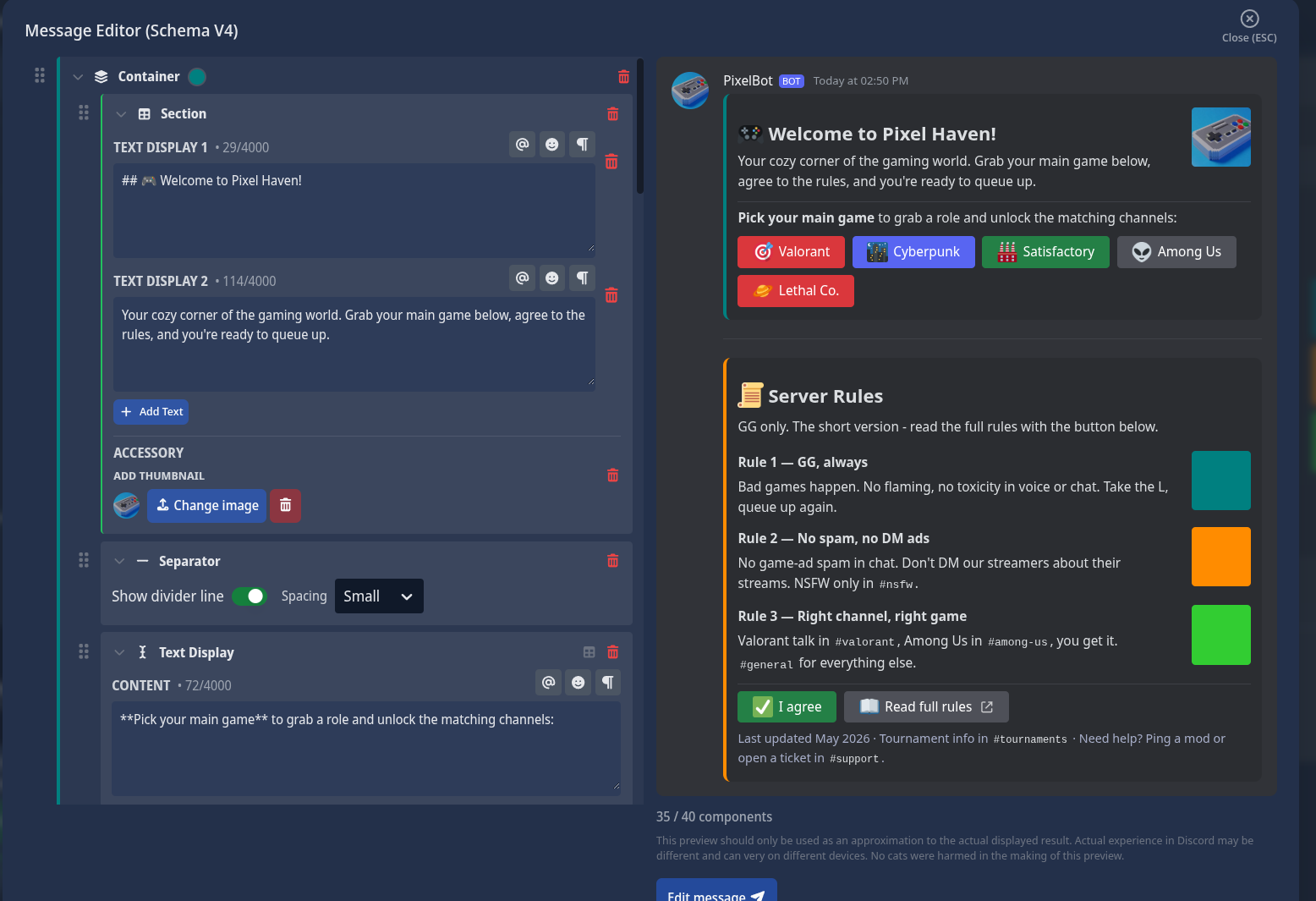
Discord shipped a new system - Components V2 - that gets you out of that. V4 is our editor for it. Easier to show than tell, so:
Stuff V4 lets you do
A few things that were awkward or impossible before.
Sections: text on the left, accessory on the right
The thing I missed most in V3: putting an image next to a paragraph. Embeds let you have a thumbnail in the top-right, but it was always tiny and always in the corner. If you also wanted a button - well, the button went to the bottom of the message, not next to the text it belonged with. So you'd write a paragraph, point to it, and hope the reader scrolled down and back up to see what the button actually did.
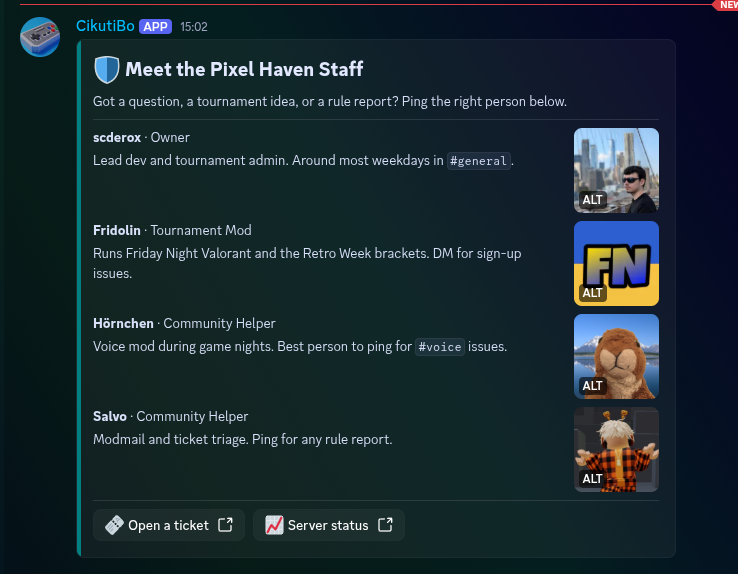
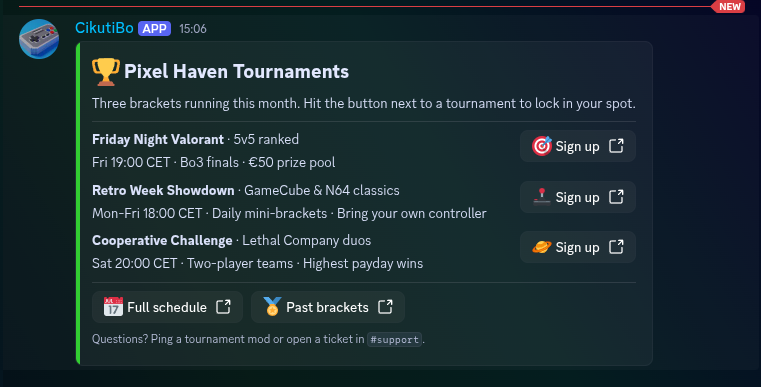
Sections fix this. Text on the left, one accessory on the right (either a thumbnail or a button), in the same row. Two Pixel Haven examples - import either to a test field to see what I mean.
The thumbnail variant is a "Meet the staff" card. Each section is one team member, their bio, and their avatar beside it:
The button variant is a tournament list - each section is a bracket, and the "Sign up" button sits where you'd naturally click it:
Import the Tournament Schedule
Multiple "embeds" with text and buttons in any order
In V3 the order was fixed: message content on top, then embeds, then buttons, in that order. Always. In V4 you can stack containers however you want, with their own colors and their own buttons inside each one:
Server icon sits next to the greeting. Each rule has its own little thumbnail. The buttons are right there with the content they belong to. One message, no second post needed.
Import the Welcome + Rules message
A real image grid
V3 was rough on images. The first one went into the embed, the rest got attached at the bottom, and the order Discord chose to show them in was its own business. Media Gallery is a proper grid component now, with alt text on every image.
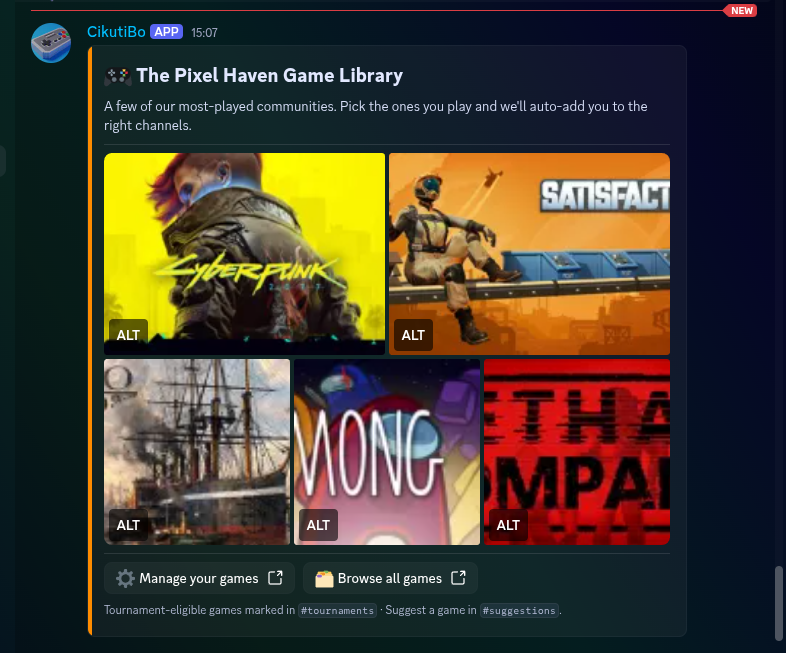
Import the Game Library - five
Steam capsules in a grid, with two CTAs underneath. The kind of thing you'd pin to a #welcome channel.
Drag to reorder
Everything in V4 is draggable. Components inside containers, options inside dropdowns, buttons inside action rows. If you've ever wanted to move an embed three slots up in V3 and ended up just rebuilding the whole message because that was faster, you'll appreciate this immediately.
Autocomplete
Small thing but I keep noticing it: type % in any text field and you get a menu of every parameter available there -
%userTag%, %guildName%, %memberCount%, etc., with a description on each one. Arrow keys to pick, enter to drop
it in. No more flipping back to the docs to remember if it's %userTag% or %user_tag%.
Same trigger pattern for emoji (:) and for @ and # mentions in fields that support them.
The full component list
For reference, here's everything you can drop into a V4 message:
| Component | What it does |
|---|---|
| Text Display | A markdown text block. Up to 4,000 characters. |
| Container | Groups components with an accent color. The closest thing to an embed in V4, just less rigid. |
| Section | 1-3 lines of text paired with a thumbnail or button on the right. |
| Media Gallery | 1-10 images, in a grid that actually behaves like a grid. |
| Action Row | Up to 5 buttons, or a dropdown. |
| Separator | A divider, with or without a line. |
| Image | One uploaded image, anywhere you want it. |
| Dynamic Image | Per-message generated image (same as in V3). |
40 per message, all draggable, containers can hold any of the above except other containers.
Where it shows up
Everywhere SCNX has a message editor. Bot Log-In messages, Custom Commands, Support Bot templates, welcome and level-up messages in the various module configs, and so on. The parameters work the same, copy/paste between fields works the same, the share-link feature works the same. The fields just have V4 available now wherever they make sense.
On V3 already?
You don't have to do anything. V3 is still the default in most places, there's no deprecation clock, and existing messages keep working. If embeds do the job for you, leave them.
If you do want to bring something into V4, the V3 toolbar has a Convert to V4 Editor button. It maps embeds to containers, buttons to action rows, thumbnails to section accessories. Two caveats:
- One-way - you can't convert back.
- Author icons, footer icons, and embed timestamps have no V4 equivalent. They'll be dropped during conversion.
The full mapping is in the docs.
Try it
Open any message editor field, click Switch to V4 Editor, start dragging stuff in. The Message Editor documentation has the full component reference, the limits page, and the V3 → V4 conversion table.
If you build something and hit a wall - a component you wish existed, a flow that feels off, a limit that bit you - let me know on Featureboard (search for "Message Editor", there's already a thread or two) or in the SCNX Discord. The beta caught a lot, but you'll find things we didn't.
Greetings from Munich,
- Simon